Sponsored by:

Fully Managed Technology Services
Fully Managed Technology Services
How to Set Up and Run
The Bochs Emulator
on a Windows™ PC
Web Presentation and Text Copyright © 2012, 2013, 2021 by Daniel B. Sedory;
except
for the Bochs icons and direct quotes from the Bochs literature, of course.
(NOT to be reproduced in any form without Permission of the Author !)
Over a decade ago, we explained how BOCHS could be used to learn Linux commands on a
Windows PC.
Here we show our readers how to use the Bochs Emulator to understand and debug Master Boot Records.
Although the Bochs Emulator has binaries and source code for a number of different OS Platforms (such as Linux), the following describes how Microsoft® Windows™ users in particular can set up and run various image files of other operating systems under the Bochs Emulator. First, download the latest Windows 64-bit Bochs files within a 32-bit executable install file (Windows XP users will need to search elsewhere). This SourceForge page will automatically find the latest download file on a site near you: http://sourceforge.net/projects/bochs/files/latest/download
When last updated, the Bochs-win64-2.6.11.exe (24 APR 2020) download file was 5,428,019 bytes (5.17 MiB or 5301 KiB; which can also be opened by
the free  7-Zip
program to inspect its contents before installing). Bochs is easy on the Registry when installed, setting only an uninstall and
file association for its ".bxrc" Configuration files (which then have a little 'box' icon
7-Zip
program to inspect its contents before installing). Bochs is easy on the Registry when installed, setting only an uninstall and
file association for its ".bxrc" Configuration files (which then have a little 'box' icon  next to them).
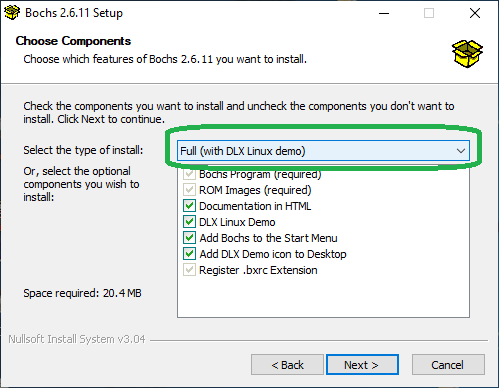
After going through the Intro, License Agreement and Users screens, you'll see the following Components screen which defaults to not installing the DLX Linux Demo; make sure to check all of the boxes;
you will see "Full (with DLX Linux demo)" when doing so, since we'll be using DLX to check your Bochs install.
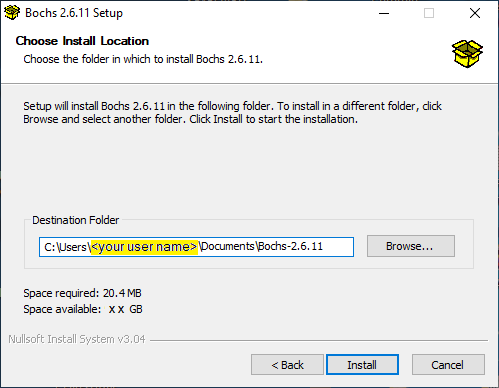
In the next install screen, we highly recommend changing the default install location from C:\Program Files\Bochs-2.6.11\ to:
C:\Users\<your user name>\Documents\Bochs-2.6.11\ or some other convenient location;
such as your Desktop.[1]
The Bochs 'docs' folder includes HTML documentation, of which only parts of the "User Guide" will likely be helpful. You can read more about Bochs here: http://bochs.sourceforge.net/.
After Bochs is installed, click on the new Desktop icon: "Linux Demo in Bochs 2.6.11" (a 'shortcut' to run.bat in the dlxlinux subfolder under Bochs-2.6.11). This will open both the "Bochs for Windows - Console" and the "Bochs for Windows - Display" in which you'll see the Bochs Emulator run through its own BIOS code similar to a real PC:
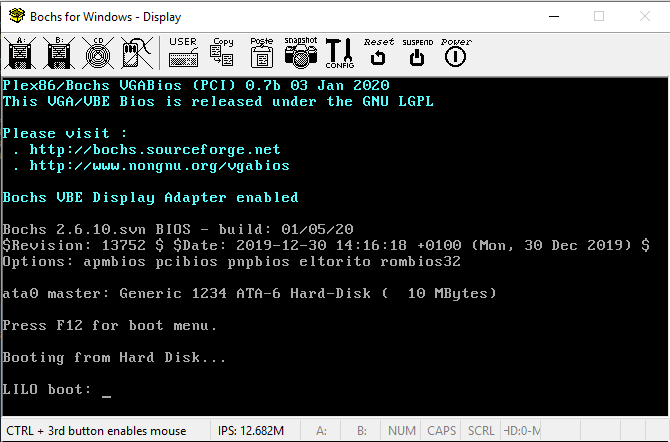
If you pressed the F12 key soon enough (start right after clicking on the icon to be sure), you would see the following appear in the Bochs for Windows Display:
Press F12 for boot menu.
Select boot device:
1. Floppy
2. Hard Disk
3. CD-Rom
_
This can be useful if you include a Floppy diskette image file in the Configuration file. Of course, without it, or a CD-ROM image file referenced there, pressing a '1' or '3' will simply result in an error message before Bochs moves on to booting from the hard disk. After Bochs starts booting from the DLX disk image file, you'll see the following scroll by on the display:
LILO boot:
Loading linux......
Uncompressing Linux...done.
Now booting the kernel
Console: 16 point font, 400 scans
Console: colour VGA+ 80x25, 1 virtual console (max 63)
Calibrating delay loop.. ok - 3.97 BogoMIPS
Memory: 31168k/32768k available (612k kernel code, 384k reserved, 604k data)
Swansea University Computer Society NET3.034 for Linux 1.3.77
NET3: Unix domain sockets 0.12 for Linux NET3.033.
Swansea University Computer Society TCP/IP for NET3.034
IP Protocols: ICMP, UDP, TCP
Checking 386/387 coupling... Ok, fpu using exception 16 error reporting.
Checking 'hlt' instruction... Ok.
Linux version 1.3.89 (root@merlin) (gcc version 2.7.2) #1 Mon Apr 15 19:46:15 ME
T DST 1996
Serial driver version 4.11a with no serial options enabled
tty00 at 0x03f8 (irq = 4) is a 16550A
PS/2 auxiliary pointing device detected -- driver installed.
loop: registered device at major 7
hda: Generic 1234, 10MB w/256kB Cache, LBA, CHS=306/4/17
ide0 at 0x1f0-0x1f7,0x3f6 on irq 14
Floppy drive(s): fd0 is 1.44M, fd1 is 1.44M
Started kswapd v 1.4.2.2
FDC 0 is a 8272A
Partition check:
 hda: hda1
VFS: Mounted root (ext2 filesystem) readonly.
Apr 28 10:21:38 init[1]: version 2.4 booting
EXT2-fs warning: mounting unchecked fs, running e2fsck is recommended
Mounting remote file systems...
INET: syslogd
Apr 28 10:21:40 init[1]: Entering runlevel: 4

Welcome to DLX V1.0 (C) 1995-96 Erich Boehm
                    (C) 1995    Hannes Boehm

dlx login: _ |
Quick Guide to Using Bochs
(beginning with 'dlx linux'):
Note: It's perfectly normal for the 'dlxlinux' emulation screen
to go completely 'blank' (all black) after a short time... unless you keep typing data into it. (Pressing the 'SHIFT' key
will cause it to reappear; as will many other keys, but SHIFT is very safe, since it doesn't enter anything on the command
line.)
Holding down the 'SHIFT' key and pressing the 'PageUp' key, will allow you to scroll back up towards the beginning of the screen
output. For each press of the PageUp key, it will scroll about 1/2 (one half) the number of lines in a full screen. This is a very
common linux/Unix keyboard function. The 'SHIFT + PageDown' key combination will scroll back down towards the current command line.
Under dlx you only need to ENTER the word 'root' at the command line to login as the "root" user.
Once you have logged in, ENTER the following commands (you can COPY and PASTE if you wish) to see the common linux executables
included with 'DLX' in these four(4) different directories/folders:
ls /bin /sbin /usr/bin /usr/sbin
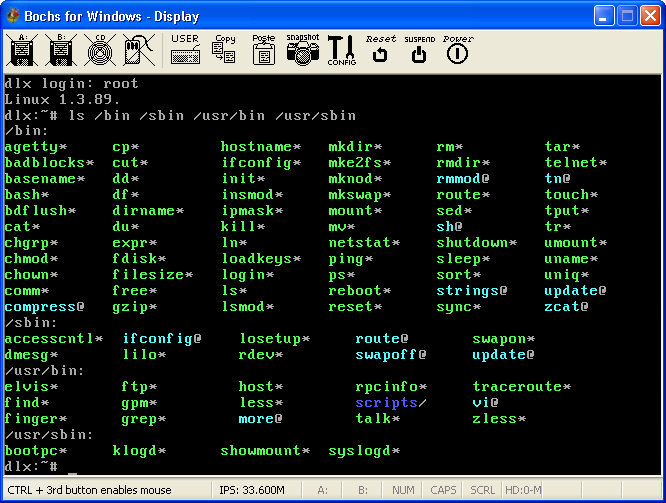
Note: You'll also find
a halt command in /etc that isn't even started (it's only one line: #!/bin/sh).
DLX does not include any man (manual) or info pages. You can try adding " --help" after a command, but if you're not already familiar with UNIX/Linux commands, we'd recommend also searching online help pages to understand what each of these might be used for.
Please note; especially, if this is your first experience with linux, that DLX is an old and very limited linux
distribution, and its version 1.3.89 kernel (which is all that linux truly is from an operating system
perspective) is very out-of-date, having come from a time when changes were being made to it almost daily. Kernel version
1.0.0 had only been released in March 1994 and 1.2.0 in March 1995, but by June 1996, versions of 2.0.x were
already being released. Three rather important kernel releases were: 2.2.0 in January 1999, 2.4.0 in January 2001 and
2.6.0 in December 2003. So, you should obtain a more recent linux distribution, which along with the linux kernel, includes a
great deal of GNU ("Gnu's Not Unix") software - free Unix-like utilities and applications. A Linux Live!
CD or DVD can be run without installation, to see why having and learning how to use a Linux distribution can be very useful;
even for a Windows PC tech. In summary, DLX is nothing like a recent Linux CD/DVD or full-blown GUI distribution that comes with
more pre-installed applications than Windows ever will. If you wish to truly experience what Linux is like today, we'd recommend
obtaining or downloading the .ISO image file of a recent Linux Distro such as the Ubuntu distribution which allows you to try
running it directly from the CD; many online help forums exist for Ubuntu. (Note: Do not install it to your PC without
first understanding everything about creating and using a dual-boot PC. A very useful alternative for many today would be to first
install either Oracle's GNU licensed VirtualBox (only a 95 MiB D/L for Windows) or VMWare's free
Player program, and install Ubuntu or any other Linux distro
directly from its .ISO file as a virtual computer running under your Windows OS.)
A very nice and fairly recent alternative to DLX for running Linux under Bochs would be the "Virtio i486" version
of ttylinux
(v 16.1 at this time). Although this is still a rather small .ISO image file (only 14 MiB; but note: You'll need a program like 7-Zip, WinRAR or WinZip to extract the .ISO file from inside the .GZ archive),
it runs Linux kernel version 2.6.34.7. Please read our page on installing
ttylinux under Bochs.
If you'd like learn more about Linux commands using DLX or Tom's RTBT and how create and install more elaborate Linux OS distributions under Bochs, such as Ubuntu, then read our older Linux Page here.
For the complete User Guide to Bochs, this file link should open in your PC's web browser: Bochs User Manual (if you installed Bochs as instructed to do so above), provided you first copy this web page to your local PC. Below is a quick guide (with notes) to the most commonly used Bochs Windows Display buttons (they're all explained in detail here: 5.3.2. The Bochs headerbar).
| BUTTON | DESCRIPTION |
|---|---|
| USER | Allows user to enter a keystroke (or combination of keystrokes) directly into the Bochs Emulator without the Host OS intercepting them. For example, you can send the "CRTL + ALT + DEL" combination to the emulated OS and the Host OS will do nothing. Only one keystroke line is allowed in the Configuration File, but you can edit it in the pop-up box before pressing the 'OK' button (or even change the stored line using the CONFIG button; see below, in its Misc section). |
| Copy | Places all the text characters from current view of the Bochs Emulator screen into your Windows Clipboard. |
| Paste | Emulates keystroke entries for whatever characters are in the Clipboard; do not use this button on a Command Line without first being sure of what's in the Clipboard! |
| snapshot | Saves the same text data as the "Copy" button does, but to a file of your choice and location (default name: 'snapshot.txt'); this can be very useful. |
| CONFIG | This stops the running simulation and puts it into "Runtime Configuration" mode. When you use this, do not click the "Quit" button under the "Simulation" section, unless you want to power-off the Bochs emulator! Instead, use the "Continue" button. (See Bochs User guide here for more.) |
| Reset | Does the same as a PC: Powers-off the Bochs Emulator and then turns it back ON again! Don't use this unless you're running a rather simple OS emulation (like DLX or DOS); unless your OS is 'hung'. |
| SUSPEND | Supposed to save the simulation in its current state, but functionality is limited (should not be used with hard disk image files). Read section 5.4 Save and restore simulation. |
| Power | Will immediately power off the emulated computer... so do not use this until after you have tried entering the halt or the poweroff commands under a more complex Linux OS (or shutting down a Windows OS correctly). (Note: We've been unable to get any of the switches for "shutdown" to function under this 'dlx' version; it only prints the same help message! And if you ENTER: shutdown now (not even listed), you'll still be disappointed, since that simply results in the message: "shutdown: cannot get into single user mode" (So you must use the 'Power button' to turn off Bochs when running the Demo 'dlx' linux version.) |
Using Bochs to Learn Exactly How a PC Boots Up
For most of you who read our pages here at The Starman's Realm, the debugger program that comes with the Bochs Windows install package will be more important than simply running another OS in its Emulator! After you've become somewhat familiar with Bochs, our next page will show you how to set up, start and run debug sessions to learn how a computer's Master Boot Record or other IPLs (Initial Program Loaders) function step by step!
1[Return to Text] NOTE: If you install Bochs in the default location (under Program Files), then due to the nature of how Microsoft decided to try handling user security in their 64-bit operating systems, you will need to run Bochs with Admin privileges! You could even install Bochs in a separate Volume, if you have one available; anywhere except the Windows Program folders.
Revised: March 28, 2012 (28.03.12) and April 11, 2021 (11.04.21).
Updated: May 2, 2012 (02.05.2012); May 10, 2012 (10.05.2012); May 19, 2012 (19.05.2012); July 21, 2013 (21.07.2013).
Last Update: April 12, 2021 (12.04.2021).
You can write to me using this:
online reply form.
(It opens in a new window.)
 The Starman's x86 ASSEMBLY Pages
The Starman's Realm Index Page